Settled
One stream of money. Two honest answers.
A full personal finance app on its own, and a shared ledger for two the moment it needs to be. What the household spent and what you are personally on the hook for are different numbers, read off the same rows, with the arithmetic shown.
- Role
- Designed and built, alone
- Year
- 2026
- Status
- In build. Web client live
- Built with
- Cloudflare Workers, D1, R2, KV, React, Expo
22 AugLandlordRent
₹21,000.00
Personal Finance Your half of it
Every tracker picks a side.
A personal tracker stops at the front door: the moment money is shared it has nothing useful to say. A shared ledger has the opposite problem. It knows who owes whom and nothing about your own month. And it fails hardest on the question that has to survive being checked: it shows a balance without showing where it came from, so the first time a number surprises somebody there is no way to ask it why, and the app quietly stops being used.
- A personal trackerWhat did I spend?Goes silent the moment a bill is shared.
- A shared ledgerWho owes whom?Knows nothing about your own month.
- SettledBoth.On the same rows, with the working shown.
Same rows, read twice.
Two people living together generate one stream of money and two sets of questions about it, and the answers are different numbers: what the household spent, and what each person is personally on the hook for. Settled holds both on the same rows and never shows a figure without naming which reading it is. Switch from Personal to Team and you stay on the page you were on. It re-reads itself under the other scope.
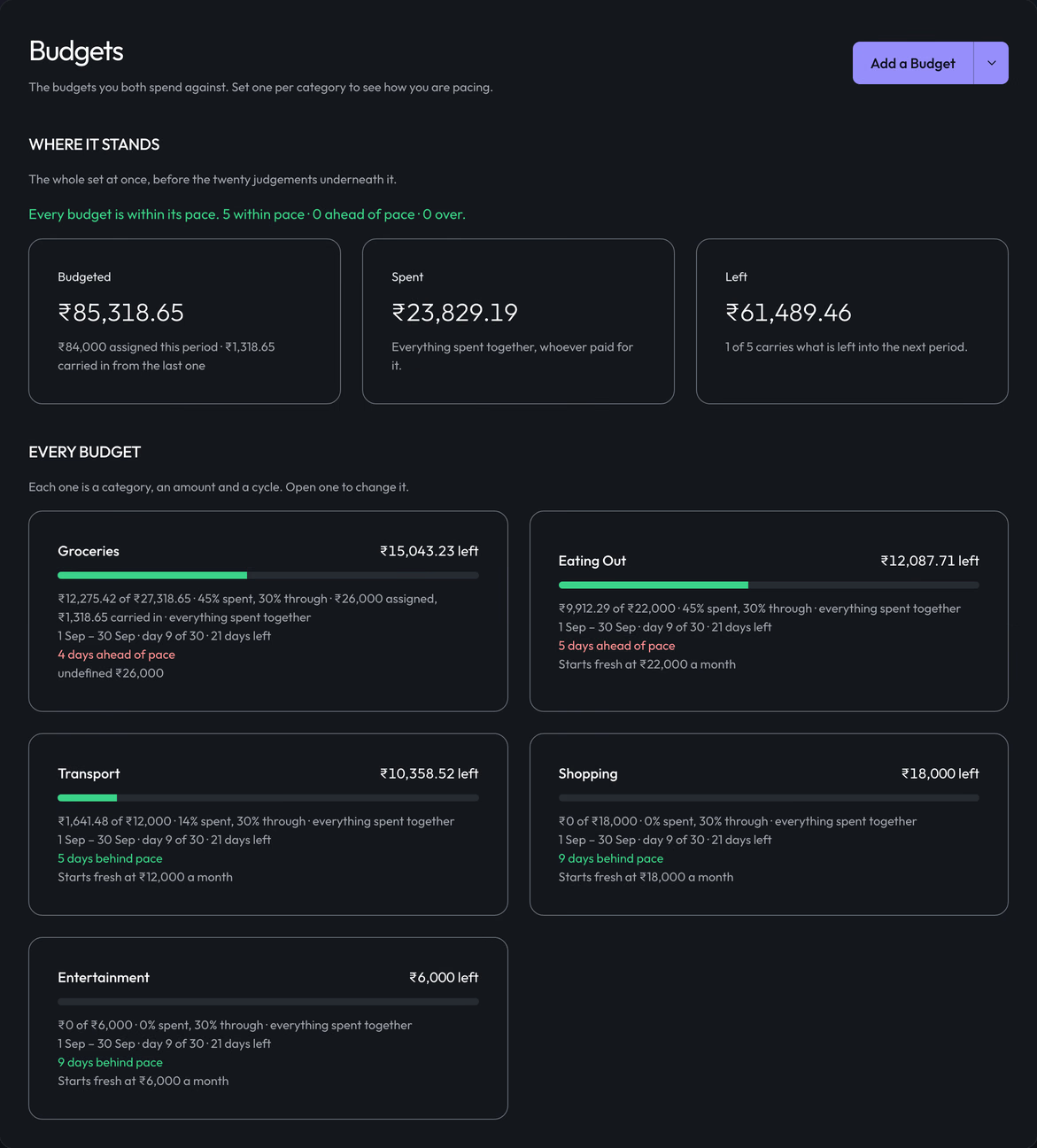
Same rows underneath. A different number on the face.
Try the arithmetic.
Six rows of one shared month, from the fixture the product tests against. Change the scope and the same rows become a different true number, computed here by the arithmetic the product ships.
Scope
Viewing as
Personal Finance What I am personally on the hook for. The sum of my shares.
A sample household month
| Date | Expense | Bill | Personal Finance, you |
|---|---|---|---|
| 08 Aug | IndiGo, client trip | ₹4,200.00 | ₹0.00 |
| 15 Aug | Toit | ₹3,600.00 | ₹2,100.00 |
| 16 Aug | Airtel | ₹1,179.00 | ₹589.50 |
| 20 Aug | Ferns N Petals | ₹2,400.00 | ₹0.00 |
| 22 Aug | DMart | ₹2,702.00 | ₹1,351.00 |
| 22 Aug | Landlord | ₹42,000.00 | ₹21,000.00 |
| Total, this scope | ₹56,081.00 | ₹25,040.50 |
Derived in the open.
Every figure traces to the rows that produced it. Press a line of the balance and the expenses behind it light up.
Partner is ahead by₹16,338.50
Settled so far, you to your partner, 27 Jul− ₹4,100.00
You owe your partner₹12,238.50
The scope switch is the product's own. Viewing As is this page's: the app knows who you are, and it is here so both readings can be seen at once.
Nothing reaches the ledger without a tap.
A bank statement, a photo of one, a CSV, a receipt, a sentence typed in plain language, a screenshot shared from another app. Every way in lands in a staging table first. A row reaches the ledger when a person validates it, and not before.
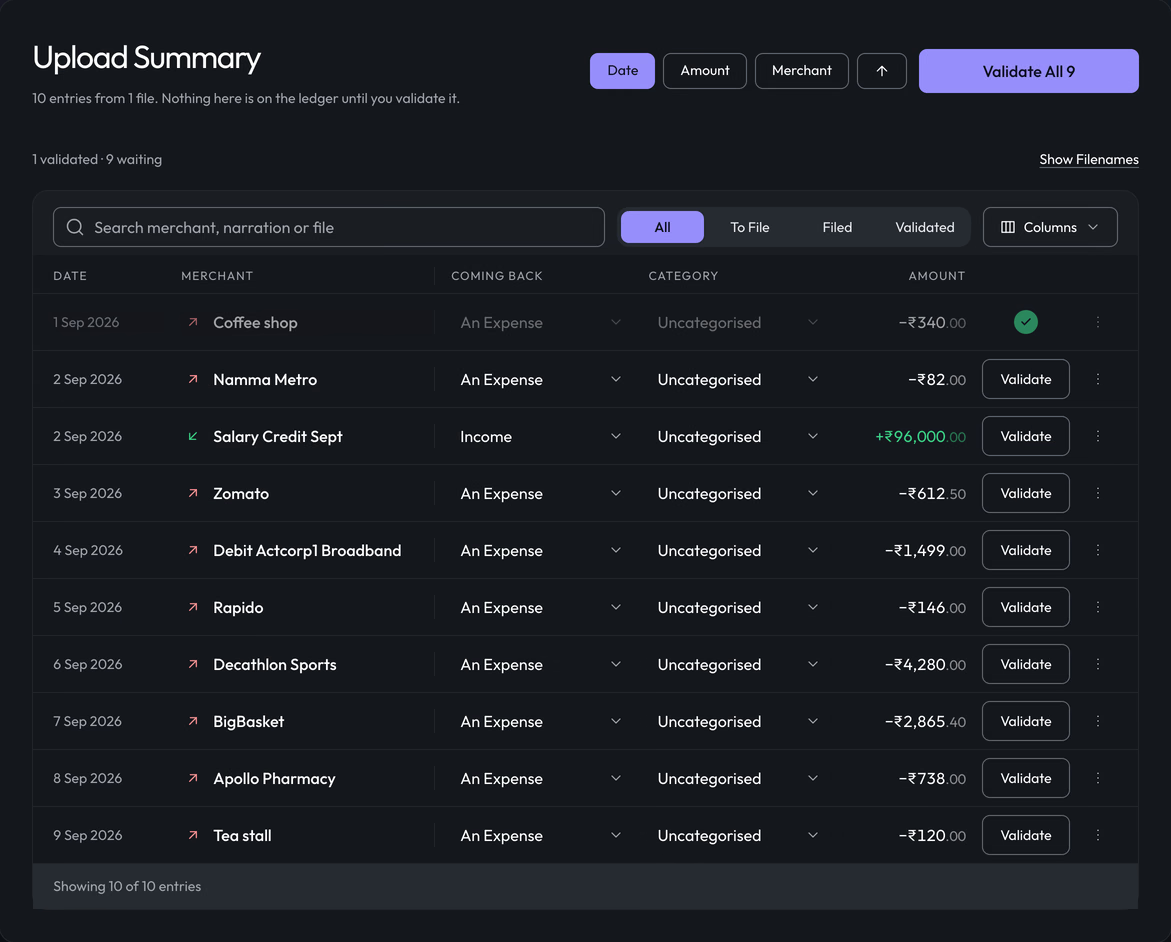
Validate. The button becomes a tick, the row settles, and the count in the footer updates.
A staged row can also be the two of you squaring up rather than something either of you bought. It records as a settlement and never as an expense, so the bill that created the debt is not counted twice.
Built to its own rules.
There is no brand hue. Colour appears only where it means something: the direction of a balance, the state of a budget, a thing about to be deleted. Two text tiers, not three. Every space a multiple of four. And hover is a promise: only what can be pressed responds to the pointer.
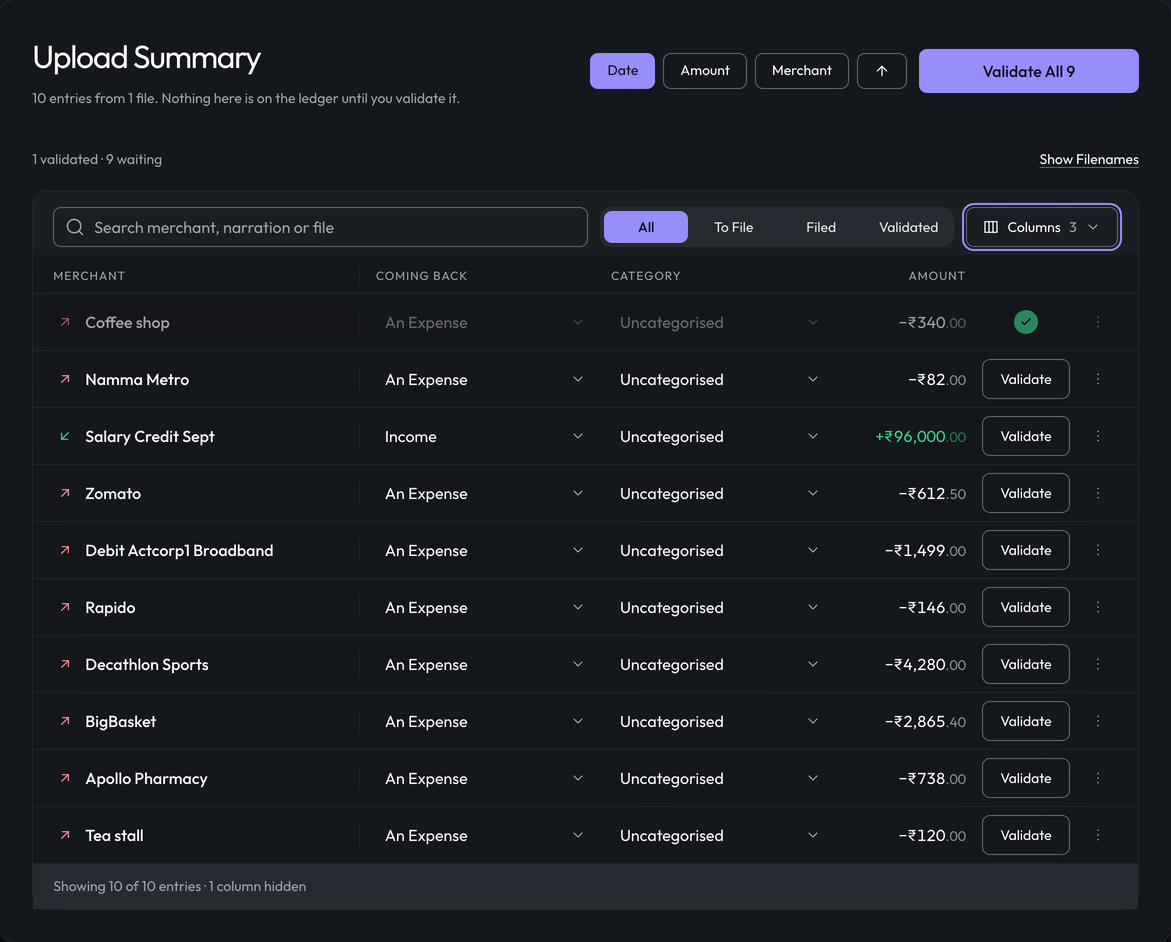
Every row slides its cells into the new grid in one transition. Nothing jumps.
This page is built to the same rules.
The work.
Nine screens of the web client. Scroll to move along them.
The rest of it.
The rest of it, if you want it. Nothing above depends on opening any of these.
Every screen names which reading it is showing, and never shows a number without naming it. On a drill-down the reading is not a control: it travels with the page, inherited from the dashboard you came from, so a category opened from Personal keeps showing your share and one opened from Team keeps showing the shared figure. A drill-down that could quietly fall back to the shared reading would show a larger number than the row that was clicked, which is the worst kind of wrong: plausible. Where you are building a question rather than following a figure, as in Ask, you pick the reading yourself and the answer says which one it used.
| Reading | What it means | Where it comes from |
|---|---|---|
| Personal Finance | What I am personally on the hook for | The sum of my shares |
| Team Finance | What the two of us spent | The sum of the expenses |
| What I paid | What actually left my pocket | The sum of what I fronted. It lives in the balance |
Capture
Money gets recorded the way it happens.
- Type it. Amount first, numeric keypad, category chips, split control.
- Say it. "450 lunch swiggy split equally yesterday" becomes a draft.
- Import a statement. Bank PDF or a photo of one, password-protected files included.
- Import a CSV. Bank exports, and migration off other trackers.
- Photograph a receipt, down to line items you can split individually.
- Share into it. A payment screenshot or a bank SMS from anywhere on the phone.
- Duplicate detection across all of them, before you can double-count.
The record
- Receipt attachments, kept with the row.
- A comment thread on any charge, for "what was this?"
- One bill split across categories. A supermarket run is groceries and household.
- Refunds and partial refunds, linked to the expense they cancel.
- A field-level audit trail. Every edit by either person, kept.
- Soft delete with a trash you can restore from.
Splits and settling
- Six ways to divide a bill, plus itemised splits driven line by line from a receipt.
- Change a split retroactively and the balance recomputes, server side, every time.
- The balance is derived, never stored. Lifetime or scoped, always labelled which.
- Exactly one balance and one place to clear it. Settling twice is the one error the app cannot allow.
Organising
- Categories with icons, colours, one level of subcategories, merge and reassign.
- Free-form tags, many per expense, orthogonal to categories.
- A rules engine. If merchant, narration, amount or source, then category, tags, group, split.
- "Always do this." Any manual recategorisation is offered as a rule.
- A merchant registry with aliases, learning from confirmations and never from guesses.
Planning
All manual entry. No bank credentials, nothing to breach.
- Budgets per category per month, household or personal, with optional rollover.
- A pace indicator: how far through the budget against how far through the month.
- Committed spend, and safe to spend in two honest readings. Neither is half the other.
- A recurring and autopay register, plus recurring detected out of imported statements.
- Price-change alerts when a subscription quietly goes up.
- Dormant subscription flags, savings goals, sinking funds, a loan tracker.
Understanding
- A period switcher on every analytic surface, and the reading named on every figure.
- Category to merchant to transactions, a few taps deep, no dead ends.
- A calendar heatmap, weekday and time-of-day patterns, streaks and no-spend days.
- Ask your ledger in plain language, and it shows the query it ran.
- A written monthly recap, anomaly nudges, and a money-flow diagram.
Trust
Silently changing the other person's row is the fastest way to lose the number.
- An activity feed of every create, edit and delete by either person.
- Per-expense edit history, in words.
- Undo, and restore from trash.
- Surprise expenses hide what was bought, never how much. The balance still reconciles.
A monorepo across a Cloudflare Workers API, a React web client, and an Expo app not yet shipped on either platform, all reading one shared package. That package is the load-bearing decision: splitting, settling, fairness, recurrence, budgets, the vocabulary and every data shape live there, and it imports nothing. The Worker supplies rows out of SQL and the clients render what comes back; neither does money maths of its own. It ships as a published, versioned artifact, so a change to the money rules is a release with a number on it. The tests boot the actual Worker against an actual database, and every build gate has a test proving the gate can fail, because a gate that cannot fail is decoration.
| Package | What it is |
|---|---|
| apps/api | Cloudflare Workers, Hono, D1, R2, KV |
| web client | React and Vite, deployed as Workers static assets |
| apps/mobile | Expo and React Native. One codebase, not yet shipped |
| packages/shared | The money rules, the data shapes, the vocabulary |
| packages/tokens | Colour, space, type, motion. Pure data |
| Gate | What it caught |
|---|---|
| dead-css | A stylesheet for a component nothing mounted |
| no-orphan-exports | A button documented as rendered by the ledger that the ledger never imported |
| tokens-generated | Token names declared in two files, with source order deciding which won |
| breakpoint | Literal copies of one number, and a media query kept in step by a comment |
| presentation | A route that did not say whether it was a place, a question or a task |
| reachability | A destination the sidebar drew and the phone reached another way |
| motion | Several durations and three spellings of one curve |
| hover-is-clickable | A hover promise on something a click would not answer |
On your own it is the whole ledger. Together it is the same rows, read twice.
Free to use. No subscription and no bank credentials: everything in it was typed, imported or photographed by you.
Next
A mobile-first logbook for motorcycle owners in India, built to be used one-handed, at a fuel pump, often with no signal.